How to Track Your Cigar Delivery Status Step by Step
Quick Summary
To track your cigar delivery status, find your order number in the confirmation email, check My Orders in your account, or enter the tracking number from your shipment notification on the carrier’s official website. Tracking information can take a few hours to appear after the label is created.
- Your order number is in the confirmation email sent right after checkout.
- Guest checkouts can use the order lookup option with your email or billing ZIP code.
- A tracking number showing no movement on day one is normal.
- Cigar shipments often require an adult signature, so plan for delivery attempts.
- Enter tracking numbers only on the carrier’s official site, never through unexpected links.
Table of Contents
- What Your Cigar Delivery Status Means at Each Stage
- Finding Your Cigar Order Number in the Confirmation Email
- Checking Your Cigar Order Status Through Your Account
- Tracking Your Cigar Package Delivery With the Carrier
- How Long Cigar Shipping Time Usually Takes
- Troubleshooting Tracking Delays and Delivery Problems
- Getting Help From Cabrera Cigars Support on Your Next Step
- Frequently Asked Questions
What Your Cigar Delivery Status Means at Each Stage
Last Updated: November 14, 2026
A cigar delivery status is not a single label, it is a sequence of messages, and each one tells you something different about where your package is and what happens next. Most orders move through the same stages in the same order, but the time spent in each stage varies by warehouse volume, carrier, service level, and destination. The table below decodes the messages you are most likely to see and what each one generally means.
| Status message you may see | What it means | Normal duration |
|---|---|---|
| Order received / Order confirmed | Payment authorized and order logged; nothing has shipped yet | Minutes to a few hours |
| Processing / Preparing for shipment | Warehouse is picking, inspecting, and packing the cigars | 1-2 business days (longer around holidays) |
| Label created / Shipping label printed | A tracking number exists, but the carrier has not scanned the box | A few hours to 1 business day |
| Picked up / Accepted | Carrier has physically scanned the package into its network | Same day as pickup |
| In transit | Package is moving between carrier sorting facilities | 1-5 business days for ground, depending on distance |
| Out for delivery | Package is on the final delivery vehicle for your address | Same day |
| Delivery attempt / Notice left | Carrier tried to deliver but could not complete it | Redelivery usually within 1-3 business days |
| Delivered | Carrier recorded the drop-off at your address | Final status |
| Exception / Delay | Something interrupted the normal flow (weather, address issue, damage) | Varies; check the carrier’s detail page |
Order processing is the stage most often mistaken for a delay. It simply means the order has been received and payment confirmed, but the package has not left the warehouse. For premium cigars, this is the time needed to pick, inspect, and pack the order so the cigars arrive undamaged.
Label created is the stage that confuses the most people. A tracking number exists and the shipment is registered in the carrier’s system, but the carrier has not yet picked up the package. A tracking number that shows no movement on day one is normal, the label was printed before the carrier’s first scan. Once the carrier scans the box, the status changes to in transit, and from that point the tracking information updates as the package moves between sorting facilities.
Out for delivery means the package is on the final vehicle heading to your address. Delivered confirms the carrier has completed the drop-off. A delivery attempt status appears when the carrier tried to deliver but could not, often because a signature was required or no one was home.
If a delivery attempt is logged because no one was available to sign, the carrier typically leaves a notice explaining how to schedule redelivery or pick the package up at a facility. If you know you will not be home, check the carrier’s delivery options as soon as the status shows out for delivery.
Watch out: a status that jumps backward (for example, from out for delivery back to in transit) usually means the package was scanned at the wrong facility or the route was re-sequenced; it is not necessarily a lost package, but it is worth checking the carrier’s detail page for the latest scan.
Quick note: Cigar shipments frequently require an adult signature. If a delivery attempt is logged, check the carrier’s notice for redelivery options before assuming the package is lost.
Finding Your Cigar Order Number in the Confirmation Email
Your order number is the key that unlocks every other tracking option. It appears in the order confirmation email sent right after checkout. Search your inbox for “Cabrera Cigars order” or check the spam folder if nothing arrives within a few minutes.
The order number usually appears near the top of the email, labeled as “Order #” or “Reference number.” Copy it exactly, including any letters or dashes. Some retailers use a separate confirmation number, so make sure you are copying the number that identifies the order, not the payment receipt.
Keep this email. A shipment notification with the tracking link arrives later, and you will need the order number to match the two.
Checking Your Cigar Order Status Through Your Account
If you created a customer account at checkout, you can view your cigar delivery status without digging through email. Sign in and open the My Orders section. Each order lists its current status, along with the date it was placed and the items included.
Select the order to see the full timeline. Account pages often show the processing date, the ship date, and the tracking number once it has been issued. This is the fastest way to confirm whether your package has left the warehouse.
If you checked out as a guest, you will not see an order history. In that case, use the order lookup option on the tracking page instead, which asks for your order number along with your email address or billing ZIP code.
Tracking Your Cigar Package Delivery With the Carrier
Once your order ships, the shipment notification contains a tracking number and a tracking link. Clicking the link takes you to the carrier’s website, where the package’s location and delivery progress are displayed.
You can also track directly on the carrier’s site. Visit the carrier’s tracking page, enter the tracking number, and press the check or track button.
Before you start, note that tracking information can take a few hours to appear after the label is created. A tracking number that shows no movement on day one is normal.
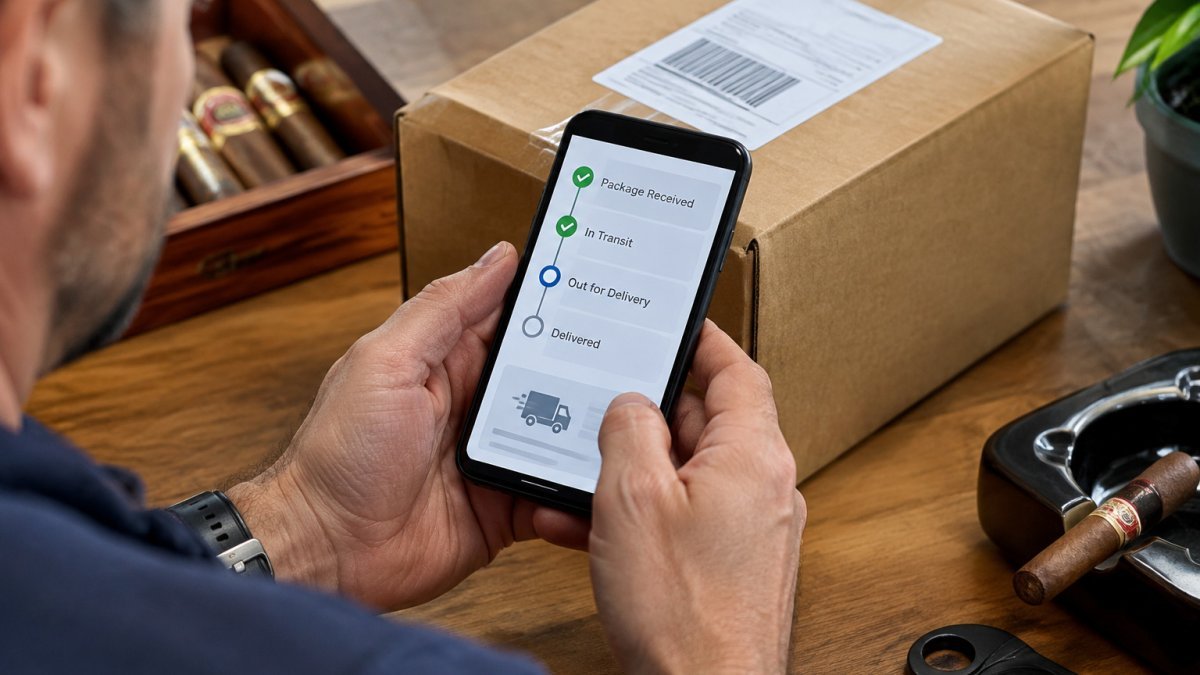
For a quick check, bookmark the carrier link from your shipment notification. You can return to it at any point without reopening the email.
How Long Cigar Shipping Time Usually Takes
Cigar shipping time depends on three things: the processing time at the warehouse, the carrier’s transit speed, and the destination.
Once in transit, delivery times vary by service level.
Your estimated delivery date appears on the order page and in the shipment notification. Treat it as an estimate, since delivery timing can change.
For planning ahead, such as an event order, place the order early enough to allow for delivery time. For current shipping costs, check the checkout summary or contact Cabrera Cigars for a quote.
Troubleshooting Tracking Delays and Delivery Problems
Most delays are harmless, but the right response depends on which status you are looking at. The scenarios below cover the situations that come up most often, with the specific steps to take for each one.
The tracking number shows no movement for two or more business days. First confirm the tracking number matches the one in your shipment notification, a single mistyped digit will return a “not found” result. If the number is correct, wait one more business day, since some carriers update scans in batches rather than in real time.
The status says delivered, but you have no package. Check around your home first, behind planters, at side doors, in a garage or mailroom, and with neighbors. Then contact the carrier with the tracking number and ask for the delivery scan details, including the time and, where available, the location.
A delivery attempt was logged. A missed attempt usually means no one was available to receive the package. Look for the carrier’s notice explaining how to schedule redelivery or pick the package up at a facility. Act promptly, carriers typically hold packages for a limited number of days before returning them to the sender.
The order shows as processing for longer than expected. Processing can take longer around holidays, during high-volume periods, or when an item is temporarily out of stock. If it has been more than a few business days, contact customer service with your order number and ask whether anything is holding the order.
The tracking page returns an invalid or not-found result. This usually means the tracking number was entered incorrectly, the label was created but not yet scanned, or the number belongs to a different carrier. Re-copy the number from the shipment notification, confirm which carrier is handling the package, and enter it on that carrier’s official tracking page.
The package is stalled at a customs or restricted-destination checkpoint.
The tracking number was never provided. Check the shipment notification email and your account’s order history first. If neither shows a tracking number, the order may still be in processing. If it has shipped and no number appears, contact customer service with your order number.
Watch out: Scammers sometimes send fake tracking emails that link to look-alike sites. Always enter your tracking number directly on the carrier’s official website rather than clicking unexpected links (Fake shipping notification emails and text messages).
Getting Help From Cabrera Cigars Support on Your Next Step
If the tracking information does not resolve your question, contact the support team. Have your order number, the tracking number, and the email address used at checkout ready before you reach out.
You can review your purchase details at checkout if you need to confirm items or shipping options. To check your order status at any time, sign in to your account and open your order history.
Contact Cabrera Cigars customer service with questions about delays, redelivery, or shipping time for your order. For time-sensitive orders, such as an event like a wedding, mention the event date when you contact support so the team can advise on the best option.
Tracking your cigar delivery status is straightforward once you know where to look. Keep your confirmation email handy, use the carrier’s official tracking page, and reach out to support early if something looks wrong.
Frequently Asked Questions
How do I check the delivery status of a cigar order?
Start with the order confirmation email from Cabrera Cigars and locate your order number. Then sign in to your customer account and open your order history, where the current order status appears. Once your order ships, the shipment notification includes a tracking number and a tracking link. Select that link or enter the tracking number on the carrier’s website to see the latest scan events, the current location of the package, and the estimated delivery date. If the order shows as processing with no tracking number yet, the package has not left the warehouse.
Where can I find my cigar order tracking number?
The tracking number is usually sent in a separate shipment notification email after your order leaves the warehouse, not in the original order confirmation. Search your inbox for the order number or for Cabrera Cigars shipping updates. You can also find the tracking number in your customer account under the order details. Copy the number exactly, including any letters, and paste it into the carrier’s tracking page. Carriers use different formats, so confirm the carrier name listed in the notification before entering the number.
What should I do if my cigar tracking number is not working?
A tracking number often takes a few hours to a full business day to become active after the label is created. If it still returns no information, check for typos and confirm you selected the correct carrier. Make sure you are not entering the order number by mistake. If the number remains inactive after one business day, contact Cabrera Cigars customer service with your order number, the billing ZIP code and the email address on the order so the team can verify the shipment.
Can I track a cigar order without a tracking number?
Yes, in many cases. Sign in to your customer account and open My Orders to view the current order status without a tracking number. You can also use the order lookup tool with your order number and the billing ZIP code or email address used at checkout. If neither option shows shipment details, the order may still be in processing, so the tracking number has not been issued yet. Contact customer service if the status has not changed within the expected processing time.